
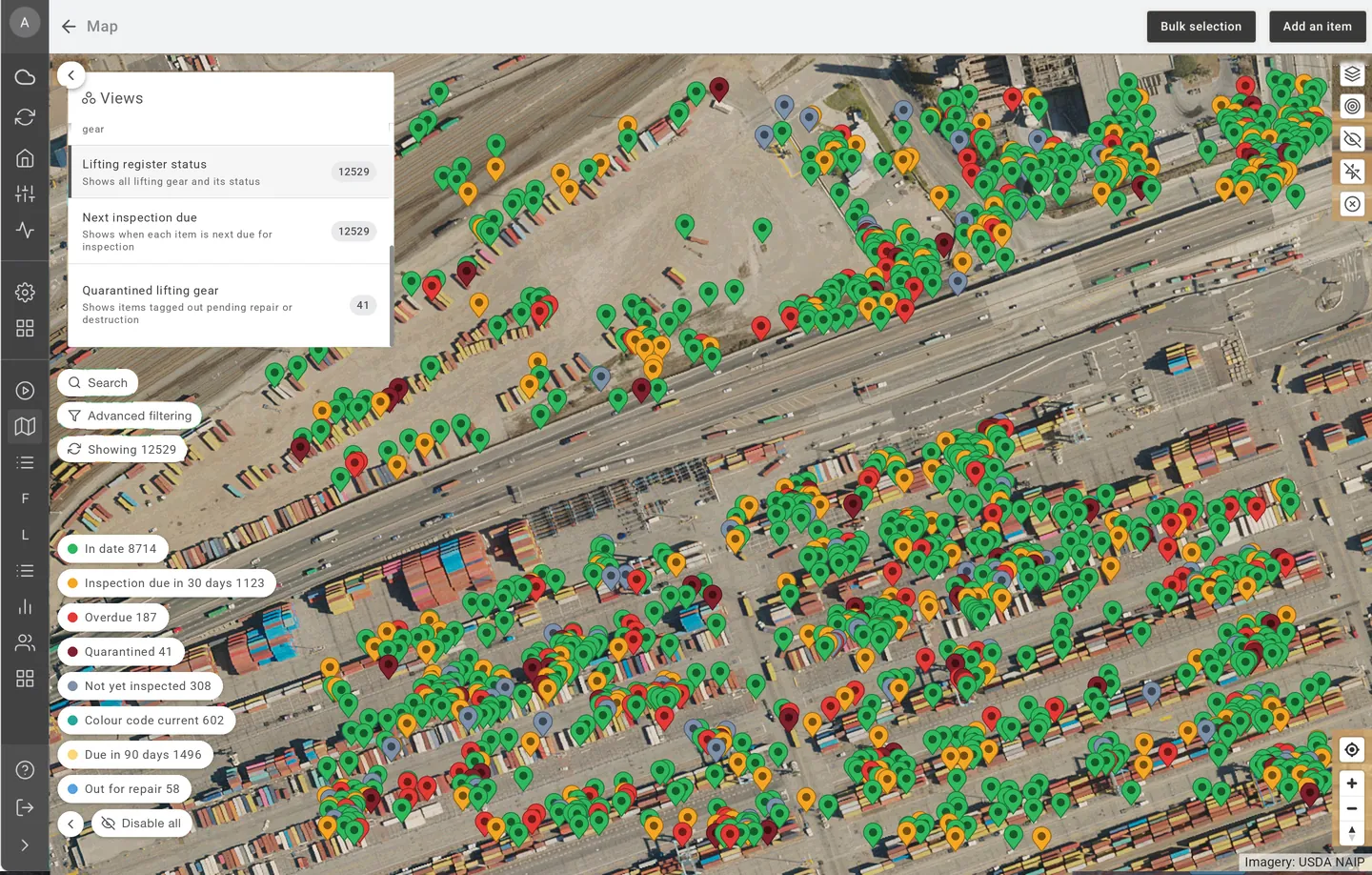
A lifting register is only useful if it is current. Paper tags, colour codes and spreadsheets fall behind as soon as gear moves between crews and sites. EXTAG keeps the register up to date with every scan.
How it works
- Tag each item. Slings, shackles, chain blocks, hoists, spreader bars and other lifting gear each get an NFC, QR or barcode tag.
- Inspect with a scan. The inspector scans the tag with a phone or tablet, works through the inspection checklist and signs off. The result is recorded against that item.
- Status updates for everyone. The register shows what is in service, due soon or overdue, without anyone retyping results.
- Follow up automatically. Reminders go out before inspections fall due, and Actions assign the follow-up when an item fails or goes overdue.
What it covers
- Lifting equipment register: every item with its ID, type, location, inspection history and status.
- Lifting gear inspections: checklists configured to how your site works and the standards your inspectors work to, such as AS 2550 and AS 4991.
- Certificates and manuals: attach manufacturer certificates and manuals, and generate certificates from completed inspections.
- Check-out and check-in: know who has each item, with due-back dates and overdue alerts.
- Incident logging: record damage or incidents against the item so the history stays with it.
- Servicing triggers: hour meter readings can trigger servicing for powered lifting equipment.
- Reporting: embedded Power BI reports show what is due, overdue and failed across sites.
One platform, tailored to lifting
Lifting is one tailored implementation on the EXTAG platform, with its own access, team and reporting. If you also manage scaffolding, inspections or test and tag, those run on the same platform, so IT approves it once. Sign in with SSO, and add as many users and items as you need (unlimited, subject to fair use).
Built in Perth and available worldwide. Most teams are up and running in weeks, not months, and sovereign hosting is available on request.
See also test and tag software, equipment registers, inspections and NFC asset tracking.
How it works on site
- Tag it. Attach an NFC tag or QR label to the asset or location.
- Scan it. Scan with any phone, pick the activity and complete the smart form.
- See it. Status and history show on the map and in reports straight away, with the location updated from the scanning device's GPS or set by a pin on the map.
Frequently asked questions
- What is lifting register software?
- Lifting register software keeps a digital record of every item of lifting equipment, its inspection history, certificates and current status. In EXTAG, each item carries an NFC, QR or barcode tag, so an inspector scans it to open its record and complete the inspection.
- Can EXTAG replace our lifting equipment register spreadsheet?
- Yes. Your existing register can be imported, subject to data quality, then each item is tagged. From then on the register updates as inspections are completed, gear is checked out and returned, and incidents are logged.
- How does EXTAG remind us when lifting gear is due for inspection?
- Each item has its own inspection cycle, and EXTAG sends reminders before it falls due. Items that go overdue are flagged, and Actions can assign the follow-up to the right person.
- Can we store certificates and manuals against each item?
- Yes. You can attach manuals and certificates to each item, and EXTAG can generate certificates from completed inspections, so the paperwork travels with the gear record.
- Can we see who has a piece of lifting gear?
- Yes. Gear can be checked out to a person or crew with a due-back date. When it is not returned on time, EXTAG raises an overdue alert.
- Does EXTAG make us compliant with AS 2550 or AS 4991?
- No software makes you compliant on its own. EXTAG helps you manage inspections against your obligations. You set up the checklists to match the standards your inspectors work to, such as AS 2550 and AS 4991, and EXTAG keeps the records, reminders and history in one place.