
EXTAG at a glance
- What it is
- A field information and asset management platform for asset-intensive organisations. Already proven and in daily use since 2018.
- What it covers
- Assets and supporting equipment excluded from ERP and maintenance systems.
- Devices
- Android and iOS phones and tablets, laptops and desktops, using the native app or a web browser, with no extra hardware to scan tags.
- One app, one login
- Field capture, reporting and mapping in one system, not separate apps. Every scan updates the system immediately.
- Tags
- NFC and QR tags for identification and data collection; GPS tags for live tracking. See the tag range, or read about NFC asset tracking and asset tagging.
- Reporting
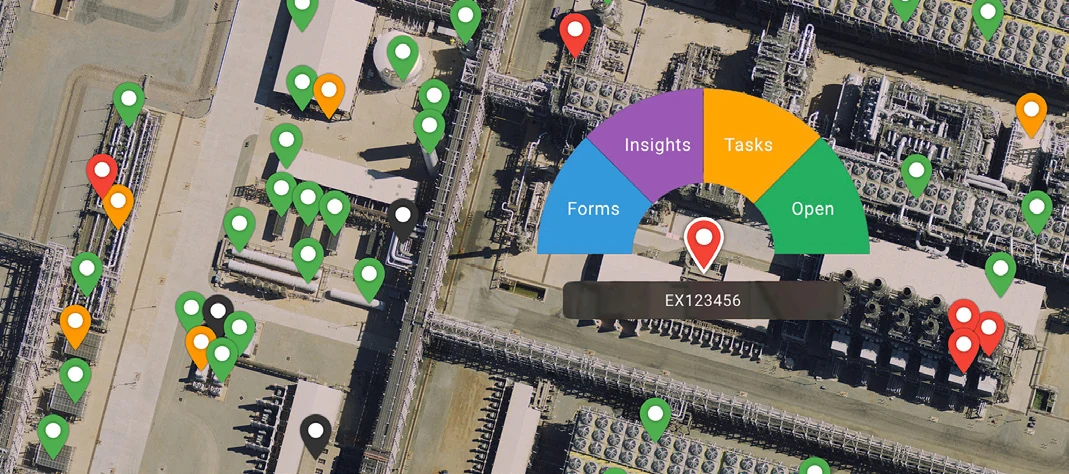
- Embedded Microsoft Power BI, live maps with colour-coded pins and dashboards down to the individual asset.
- Data in and out
- Initial data import brings in your existing asset data, such as spreadsheets and ERP extracts, to set up your register. Your data is yours; export it whenever you need to.
- Integration
- Connects to the systems you already use through their available APIs; our team configures it.
- Configuration
- Configured, not coded. The EXTAG team does the configuration for you.
- Hosting & security
- The EXTAG platform is hosted on AWS in Australia, and your data stays in Australia. EXTAG is ISO/IEC 27001 certified. Security & data hosting
Two ways to use EXTAG
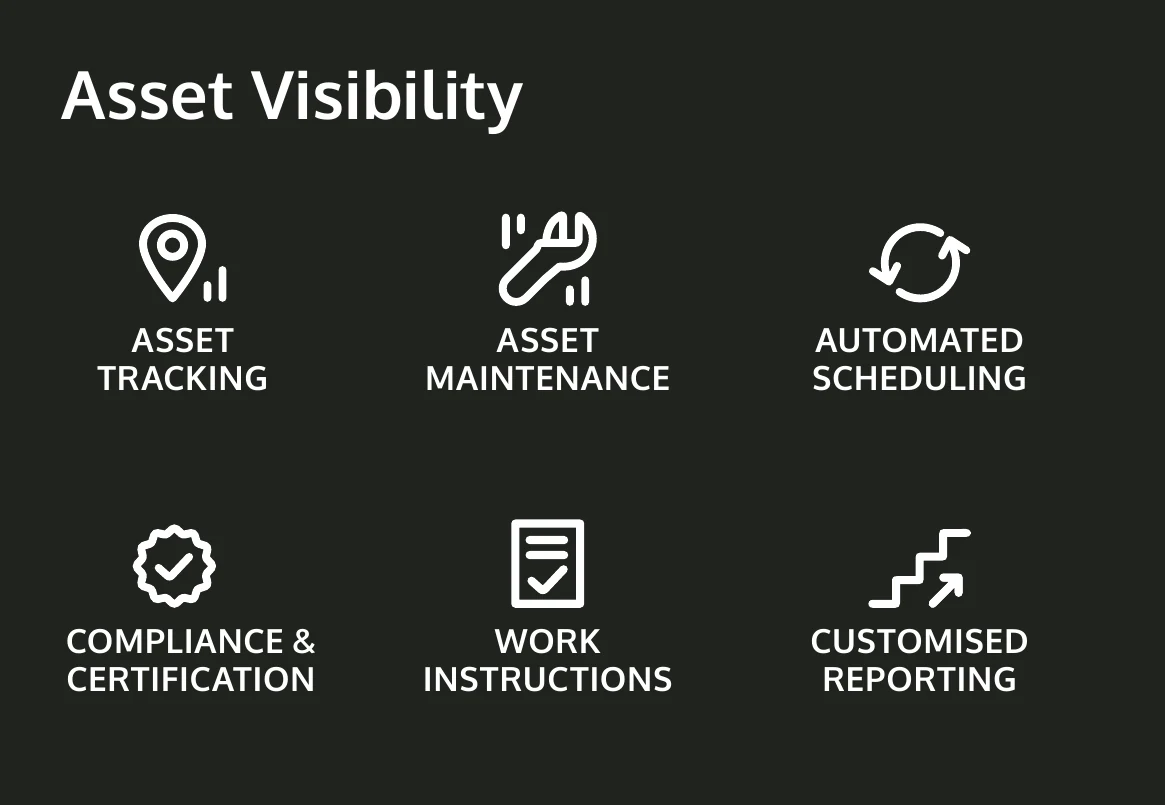
Run alongside your ERP, or as your CMMS
One platform, two ways to use it. Keep your ERP for core assets and use EXTAG for everything it leaves out, or run your maintenance in EXTAG itself.
Alongside your ERP
Your ERP stays the system of record for core and critical assets. EXTAG manages the equipment it does not, with scheduled inspections, compliance and field data. EXTAG connects to your ERP and other systems through their available APIs, pushing and pulling the data you need, and our team sets it up so the right data goes to the right place.
As your CMMS
Some organisations do not have a CMMS, or want a simpler one. EXTAG can run it all: asset register and hierarchy, planned and preventive maintenance, reactive work orders, assignment, backlog and overdue tracking, contractor evidence and reporting, all from a scan on a phone or tablet, and it works offline.
Tagging
Tags connect the physical world to the digital world
Attach a tag, scan it with a phone to open the right information and forms, and see the result instantly on dashboards and maps.
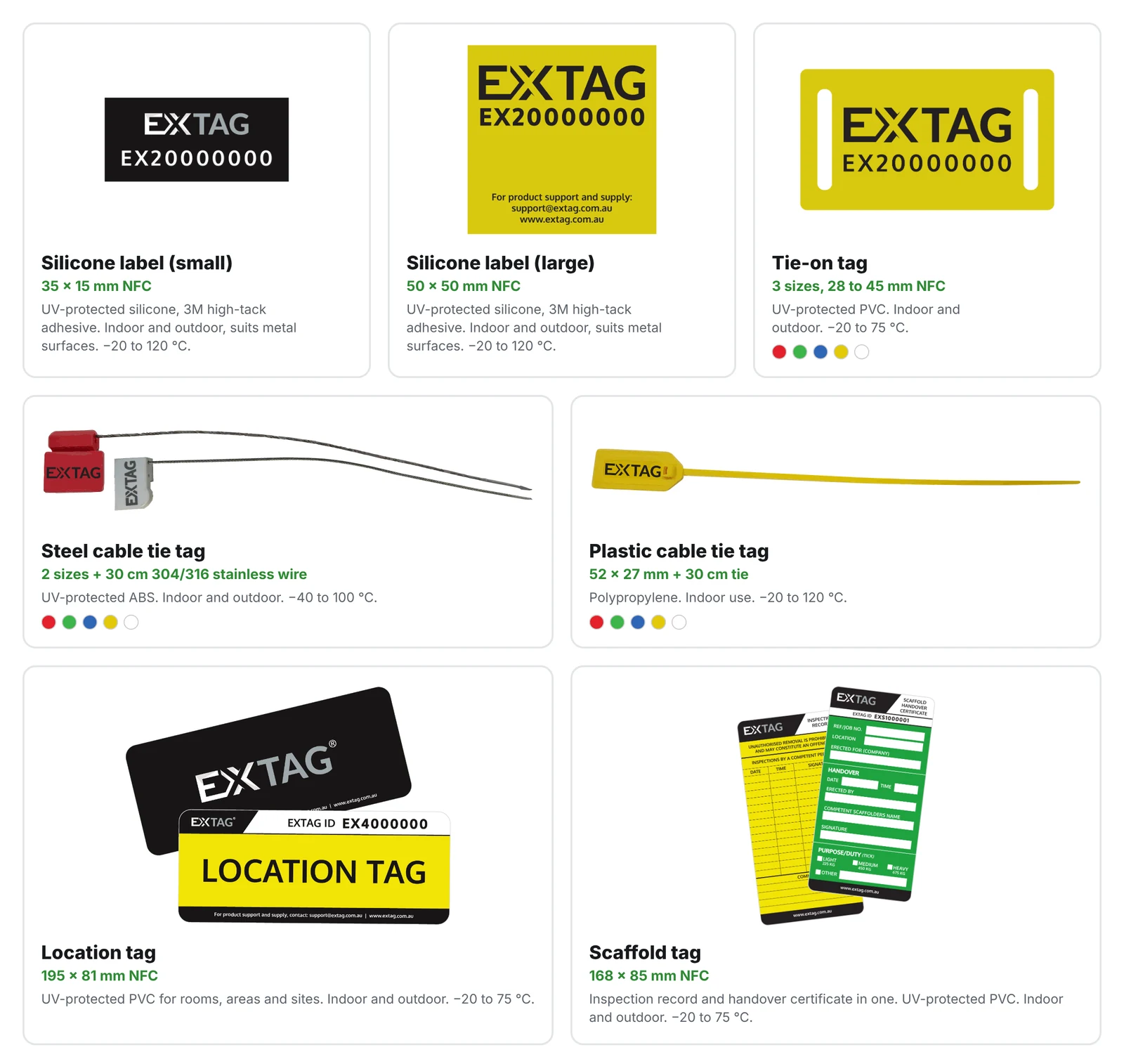
EXTAG NFC tags are read with a tap of a standard phone or tablet, and weatherproof QR labels suit places where a camera scan works better. Tag an asset, a piece of equipment or simply a location to identify it, open its information and collect data quickly. For high-value equipment that needs live tracking, EXTAG GPS tags with cellular connectivity add live location and sensor capability.
NFC tags and QR labels are not live trackers. Each time a tag is scanned, EXTAG can update the asset's location using the scanning device's GPS, and static assets can have their location set by dropping a pin on a map.
NFC tag range
QR code label range
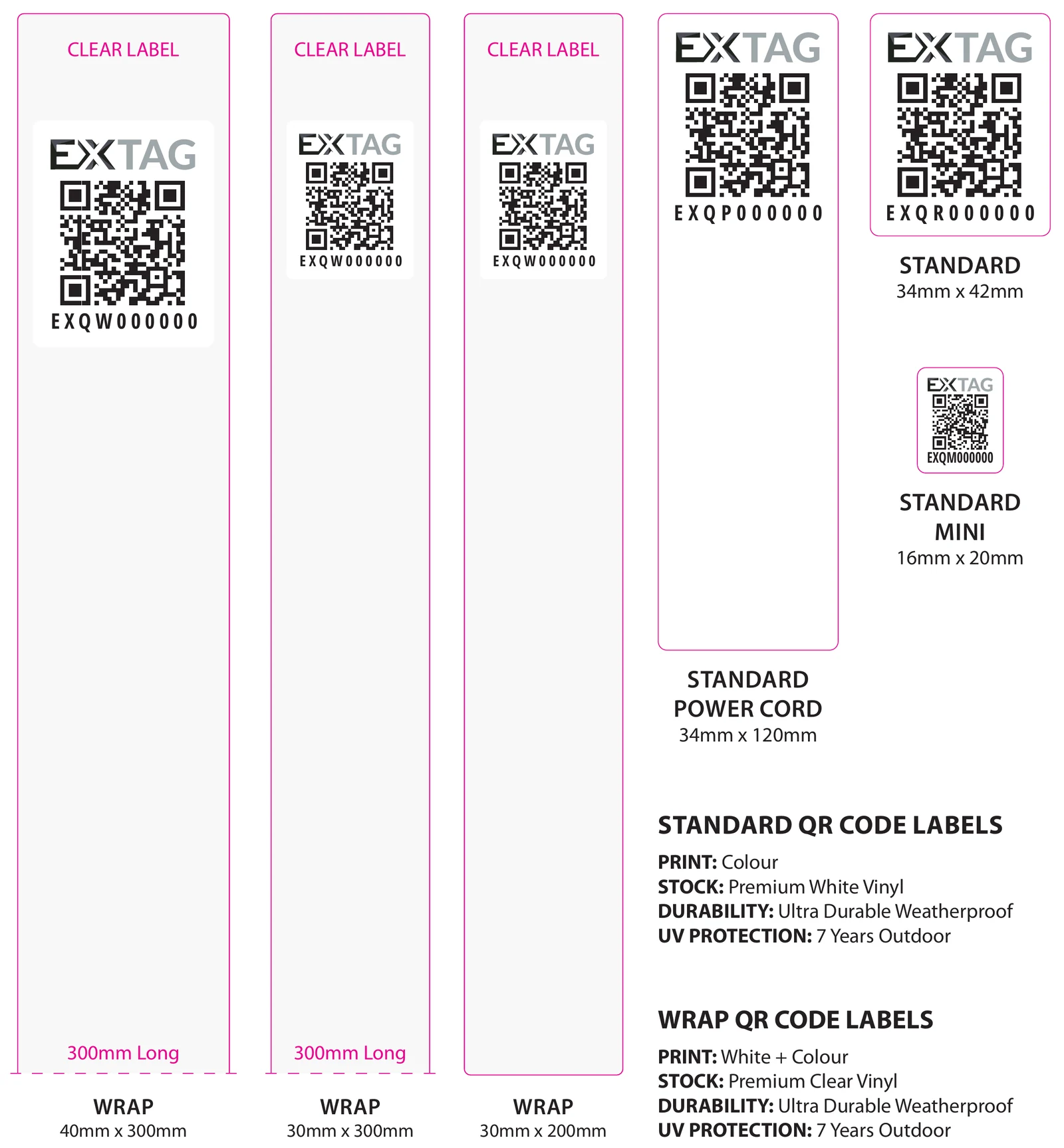
For product support and supply, contact support@extag.com.au.
Scanning
Phone and tablet optimised
Scanning technology is already built into standard phones and tablets, so you don’t need any extra hardware to use EXTAG NFC tags or QR labels.
EXTAG is designed around scanning a tag. If you’re in the field and need to complete an activity, simplicity is key. Just scan the tag and select your activity. Simple.
EXTAG runs on Android and iOS phones and tablets, as a native app or in a web browser, and on laptops and desktops in current Edge, Chrome and Safari. Every scan updates the system immediately, so field users, supervisors and dashboards see the same status at once.
Offline
Works offline, wherever the work is
EXTAG works offline, supporting remote operations and industrial areas.
Scanning and forms keep working without a signal, and the data syncs when you are back in coverage, so crews can keep recording accurate field data in remote locations and industrial areas.
Asset register
One record for every asset, in its place in the hierarchy
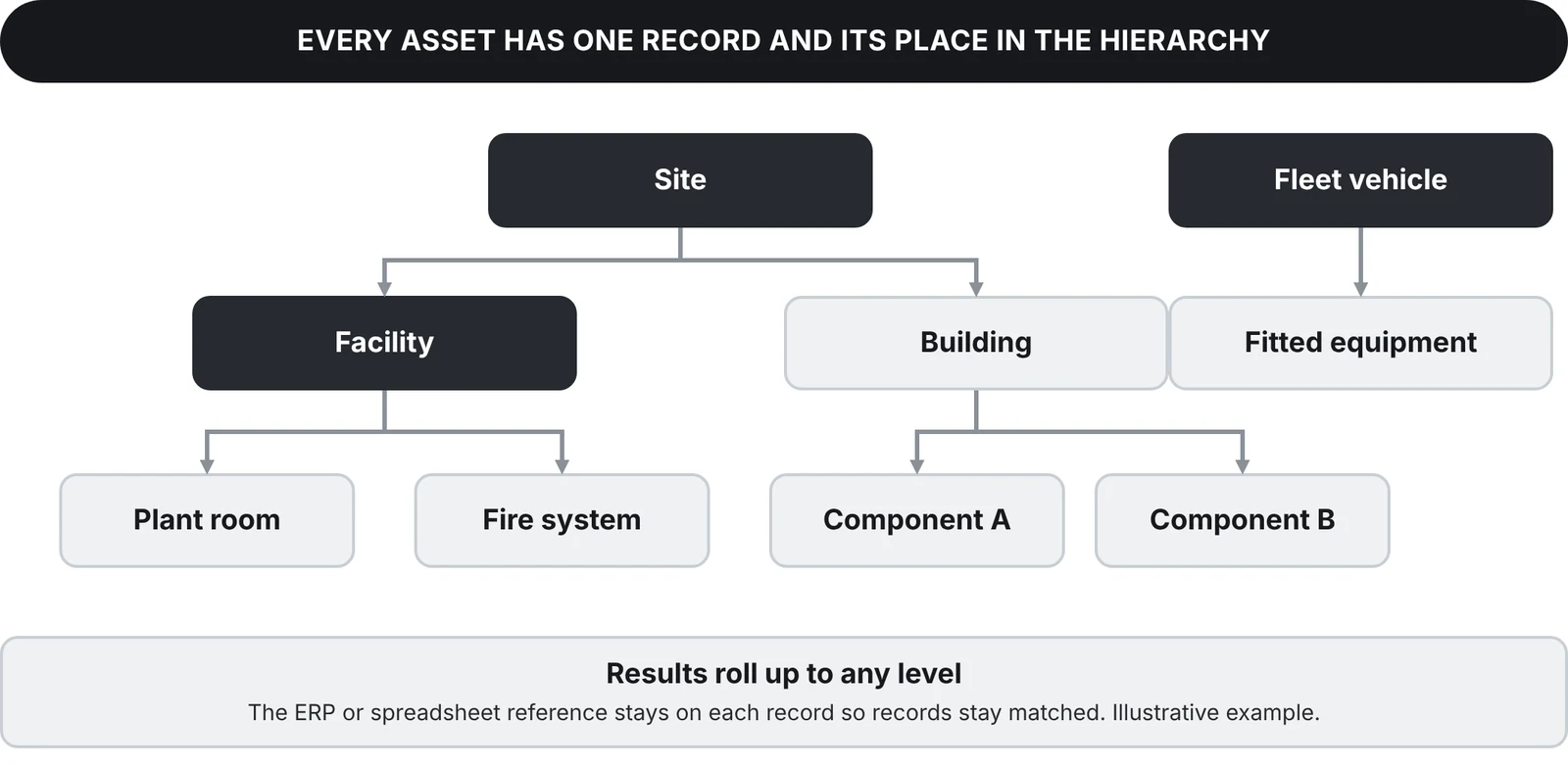
Every asset has one record, with its place in the hierarchy and its ERP or spreadsheet reference. Group by site, building, component or class, and roll results up to any level.
Fitted equipment sits under the vehicle or building it belongs to as child records. Existing registers are brought in as they are, and the original identifiers stay on each record so records stay matched. See equipment register software and facilities, property and fleet.
Core asset register features
- Identification: NFC tags, QR codes and barcode scanning for fast mobile scanning and audit or stocktake reconciliation.
- Lifecycle and maintenance: automated servicing and calibration reminders, hour-meter and odometer readings that trigger servicing, and electrical test and tag cycles.
- Custody and check-out: check-out and check-in, assignment history, due-back dates and overdue alerts. Location updates on each scan from the device's GPS, or from a pin on a map for static assets.
- Compliance and auditing: manuals, service certificates and documents on each asset, safety checklists, incident logging, certificate generation and proof of presence.
Scale
Built for scale: from hundreds to hundreds of thousands of assets
EXTAG is used for everything from a few hundred assets to hundreds of thousands of assets, with the same app whichever end of that range you are at.
For large-scale asset management and high-volume asset registers, every asset still has one record in its place in the hierarchy, so you can group by site, building, component or class and roll results up to any level. Maps, dashboards and custom views show status across the whole register. Forms and workflows are configured from templates rather than coded, so adding asset classes does not need a release or data migration, and crews keep working offline on remote sites. EXTAG gives enterprise asset management control over the assets your ERP excludes, and you can start with one asset class and grow.
Smart digital forms
Forms like you’ve never seen before
With an extensive array of form options, rapid change capability, and complete version control, if you have a requirement, EXTAG forms can do it. And we can do it fast.
- Buttons, sliders, selectors, tabs
- Dynamic colour
- Conditional logic
- Embedded images
- Live calculations
- Version control
- Required fields and validation rules
- Photos and signatures
How we use smart forms
Our smart forms are used everywhere in the EXTAG system. This underlying technology forms the backbone of the EXTAG Platform and is used to define assets, equipment and locations, along with all of their related activities and tasks.
Want to see this on your assets? Book a demo
Actions
Actions: guided workflows
Actions work like an old-school wizard that steps you through a sequence, for example checking equipment in or out.
An Action can sequence any number of steps and options to match exactly how you operate in the field, automatically updating all related data and forms for each piece of equipment.

Configured, not coded
Configured, not coded
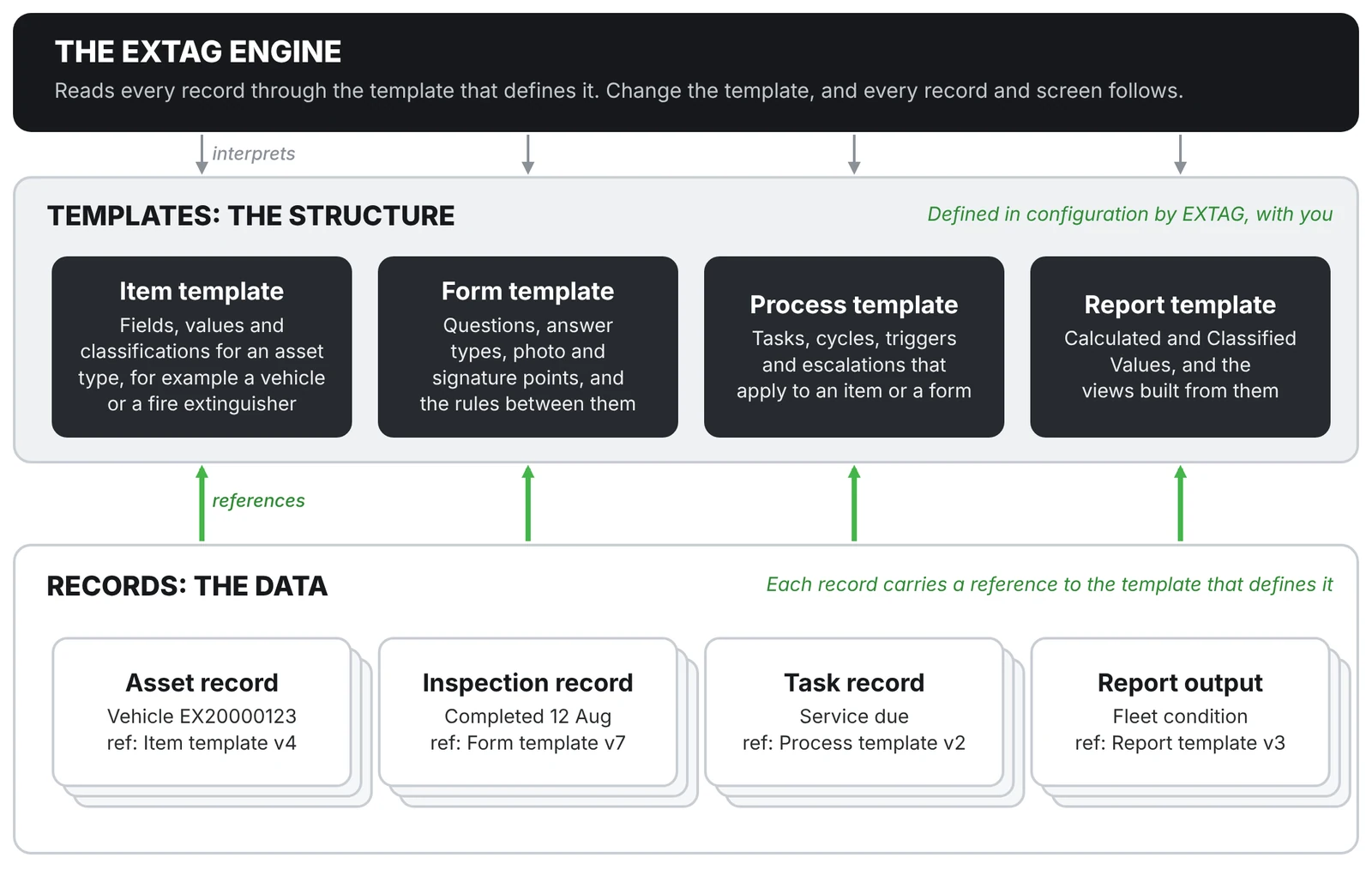
EXTAG’s structure is defined by templates (configuration, not code). Asset types, forms, processes and reports are all templates, so changing a form or adding a field needs no software release and no data migration.
Every record keeps a reference to the template version it was created with. When a form changes, historical inspections keep their original answers, and new records follow the updated template from that point on.
The same change, two ways
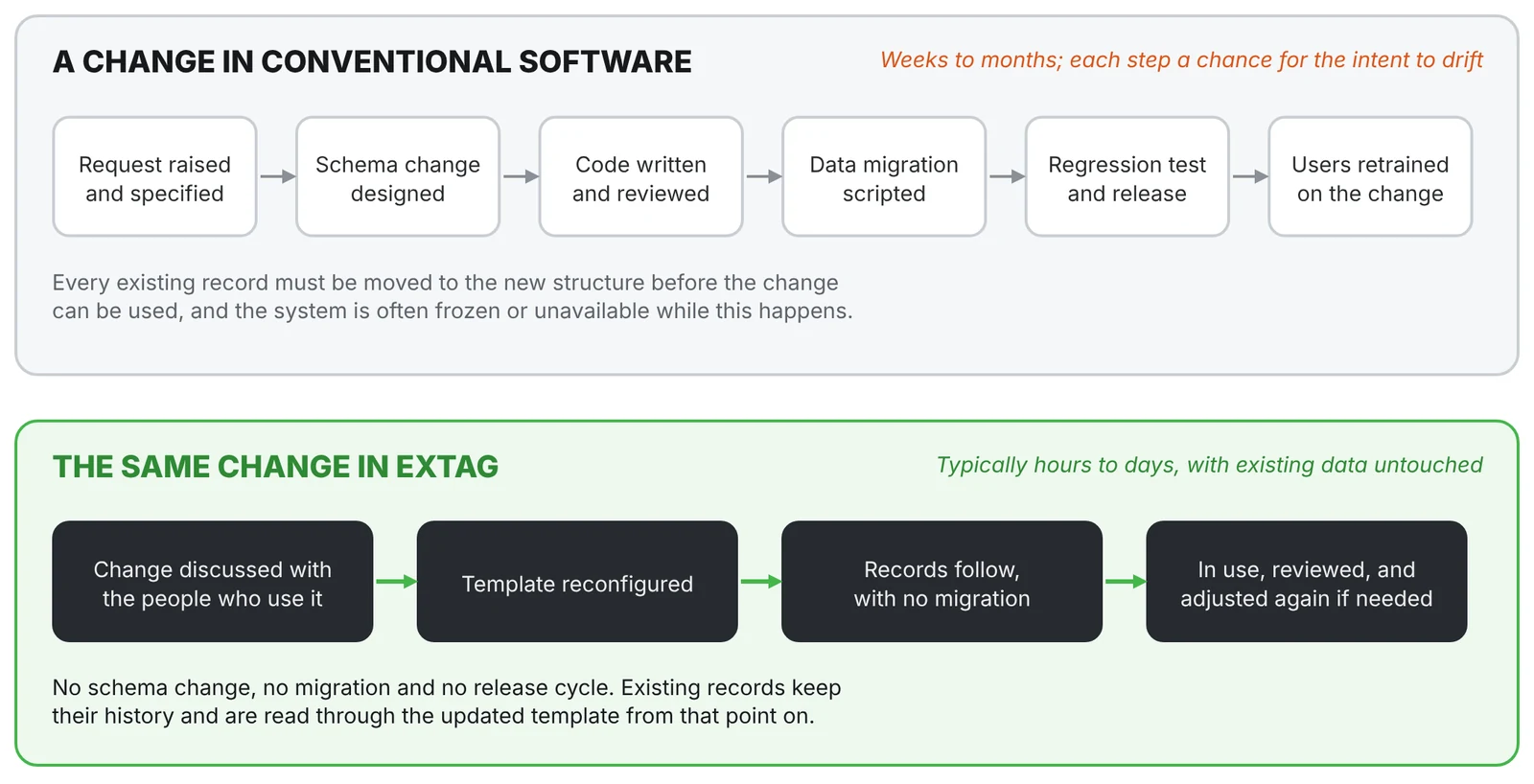
In conventional software, a change means a specification, a schema change, new code, a data migration, regression testing and retraining, which takes weeks to months. In EXTAG the change is discussed with the people who use it, the template is reconfigured and records follow, typically within hours to days. That is how improvements happen in days, not months.
Linked actions and business logic
One action starts the whole job. Your rules make sense of it.
Start with any action: an inspection, a check, an issue report or a new job. For example, submit a scope of work on an asset, and EXTAG works out the rest: the related activities are created, the next one is highlighted, and the whole scope is tracked live.
- Actions guide your people in the field. Each step is laid out in order, so the right thing happens the first time.
- Pending and linked actions follow on automatically. One activity spawns the related ones, the next step is highlighted ready to go, and you can see the progress of the whole scope as it happens.
- Business logic turns the data into decisions. The EXTAG team configures bespoke rules and algorithms for your business, so the right data goes to the right place, into Power BI reports and activity planning for your teams.

Reporting & visualisation
Making your data valuable
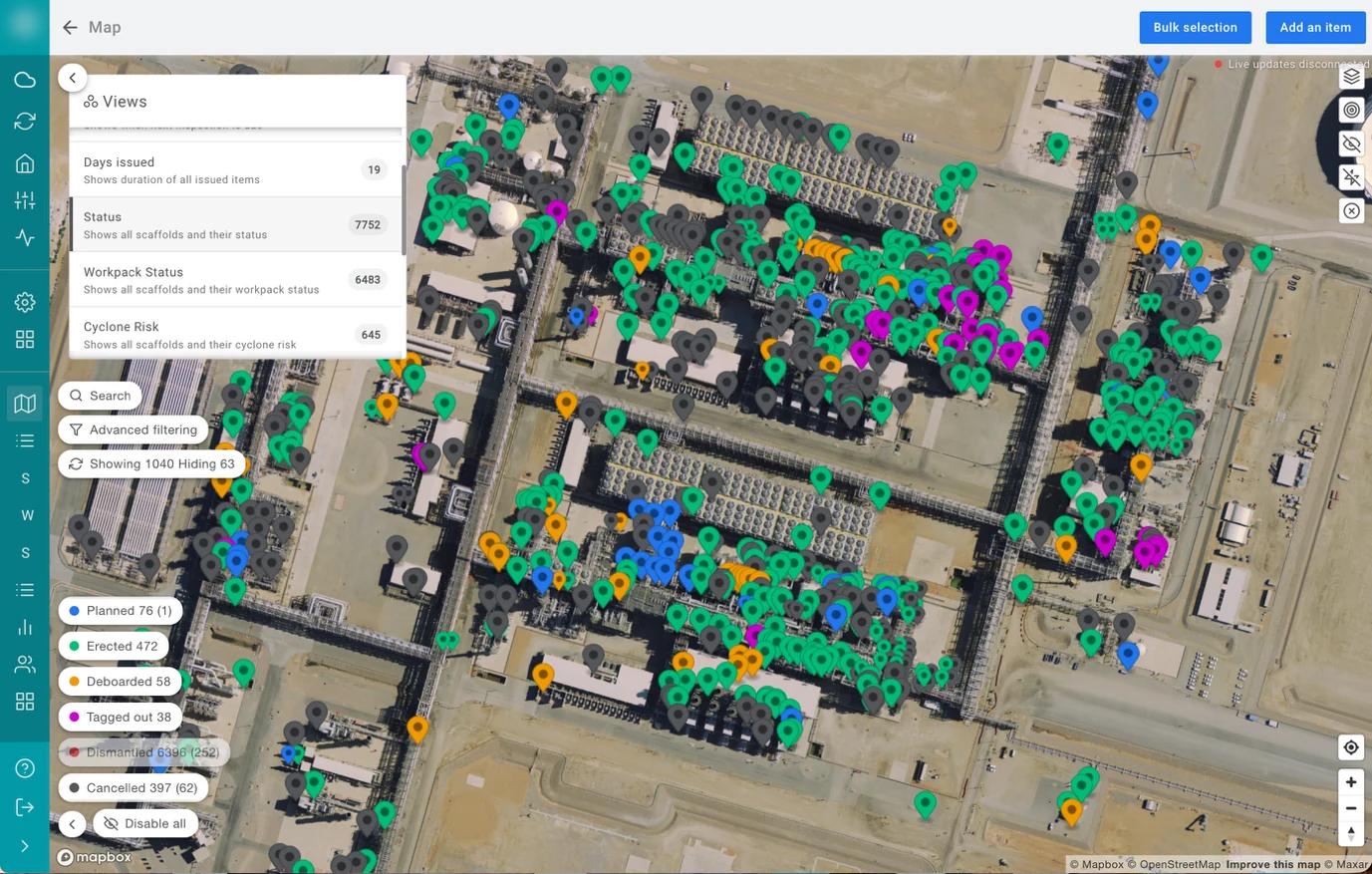
When it comes to slicing and dicing your data, EXTAG can display it any way you like. With Microsoft Power BI embedded in EXTAG, we can create any view you need to operate efficiently, discover insights, and provide transparency internally or to your customers, from live maps and dashboards down to the individual asset.
Reporting is part of EXTAG, not a separate project. Maps, dashboards and Power BI reports sit inside the application and are built from the same data your crews capture. Maps show pins, lines and areas. Calculated and classified values turn raw data into a score, a status or a risk rating, such as a traffic light. Lifecycle forecasting, valuation and utilisation reporting all depend on the data captured, and because we use Power BI we can create any report you need.
The tougher question to answer is: what are the questions you need answers to?
Integration
We integrate with your ecosystem
EXTAG integrates with your ERP, CMMS and other internal systems. We work closely with you to determine what data needs to go where, and make it happen.
EXTAG connects to the systems you already use, pushing and pulling data through their available APIs, and our team configures the integrations so the right data goes to the right place. Each asset record can hold the identifiers used in other systems, such as the ERP asset number, so records stay matched.
Security
Secure, and hosted in Australia
EXTAG is ISO/IEC 27001 certified and hosted on AWS in Australia, so your data stays in Australia. Sovereign hosting is available on request. It is built and supported in Perth, with single sign-on (SSO), multi-factor authentication and encryption.