Yes, EXTAG can be your CMMS. Many organisations keep their ERP for core and critical assets and use EXTAG for everything it does not cover. Others, without a CMMS or wanting a simpler one, run their maintenance in EXTAG itself. It is the same platform either way, configured to how your people already work.
What you get when EXTAG is your CMMS
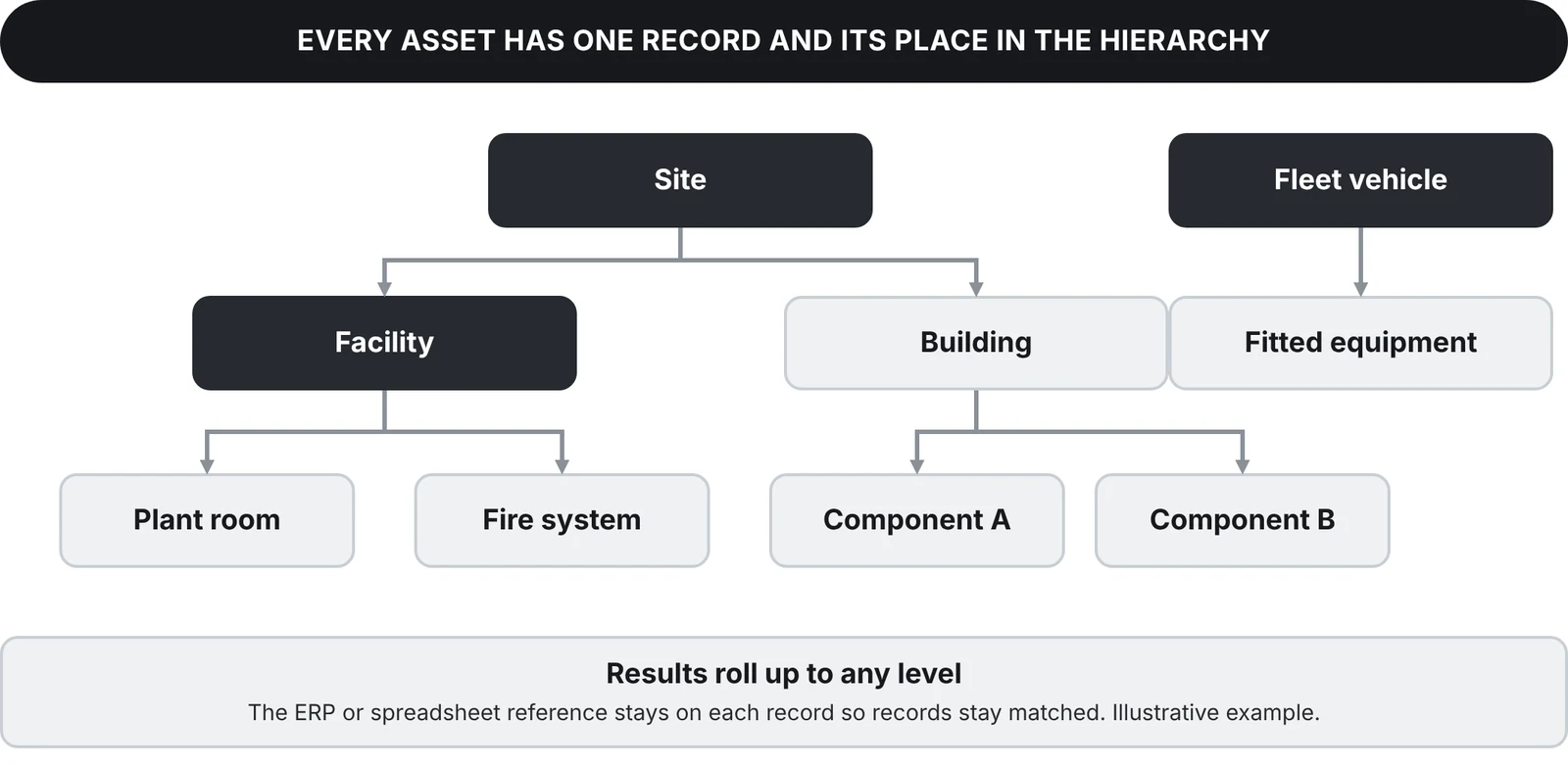
- One asset register with a hierarchy. Site, facility, building and component, with the ERP or spreadsheet reference kept on every record.
- Planned and preventive maintenance. Auto-schedule hourly, monthly, distance-based or any other cyclical activity from the criteria you set.
- Reactive work orders. Raise a work order from a scan. People who only need to report a problem just scan the tag and say what is wrong.
- Assignment. Give work to your own people or to contractors, who scan the same tags and complete the same forms.
- Closure evidence. Photos, signatures and readings are captured against the asset when the job is done.
- Cost capture. Record the cost of work against the asset it belongs to.
- Backlog and overdue tracking. See what is due, what is overdue and what is waiting, by asset, site or team.
- Reporting built in. Maps, dashboards and embedded Power BI reports, built from the same data your crews capture.
- Works offline. Scanning and forms keep working without a signal and sync when back in coverage, supporting remote operations and industrial areas.
What EXTAG does not do
EXTAG does not do your ERP’s finance, procurement or stores functions, and it does not replace your ERP. If you keep an ERP, EXTAG works alongside it and connects to it. EXTAG connects to the systems you already use, pushing and pulling data through their available APIs, and our team configures the integrations so the right data goes to the right place.
Start small, grow into the system
EXTAG is used for everything from a few hundred assets to hundreds of thousands of assets, and you can start from your existing equipment register.
Start with one asset class and the way your people already work. Because forms, tasks and workflows are configured rather than coded, you can add asset classes, work types and reports as you go. Implement in weeks, not months.
Looking for a CMMS in Australia? See CMMS software in Australia: built and supported in Perth, hosted on AWS in Australia.
How it works on site
- Tag it. Attach an NFC tag or QR label to the asset or location.
- Scan it. Scan with any phone, pick the activity and complete the smart form.
- See it. Status and history show on the map and in reports straight away, with the location updated from the scanning device's GPS or set by a pin on the map.
Every asset in its place